In this guide
- What a card scanner actually reads
- How to scan a card with Pullwise, step by step
- What must be readable on Pokémon, Yu-Gi-Oh! and One Piece cards
- Camera habits that make scans work the first time
- When a scan misses: glare, sleeves and wrong matches
- How to scan a binder or bulk lot
- Scanning cards to sell: what the price means and what it misses
Lay the card flat in soft side light, fill the scanner's frame, and make sure the small printed number is sharp and free of glare: 025/198 on a Pokémon card, LOB-EN001 on a Yu-Gi-Oh! card, OP01-001 on a One Piece card. Then check the match and pick the finish yourself (holo, reverse holo, 1st Edition, rarity, parallel), because the number often can't tell those apart. If a scan misses, tilt the card to move the glare, add light, or type the name or code into a free search.
What a card scanner actually reads
Card scanner apps identify a card in one of two ways. Some match the picture: they compare the artwork with a database of card images. Others read the printed text, such as the collector number or set code.
Picture matching has a known weak spot. TCGplayer's own help page warns that its app doesn't always pick the right set when the same artwork was printed in more than one set. Reprints with identical art are common in all three games.
Pullwise reads the text. It finds the printed number or code, looks up the exact print, then shows a pack-opening reveal and the price. The photo is read on your phone and deleted, and recognition works offline. For a scanner like this, the artwork is background. The few characters of small print are what must come through sharp.
The number pins down the card, but not always the finish: reverse holos, Yu-Gi-Oh! rarities and One Piece parallels can share a number with the regular print. That's why every scan ends with you choosing the finish. If you're still picking an app, see our card scanner apps compared.
How to scan a card with Pullwise, step by step
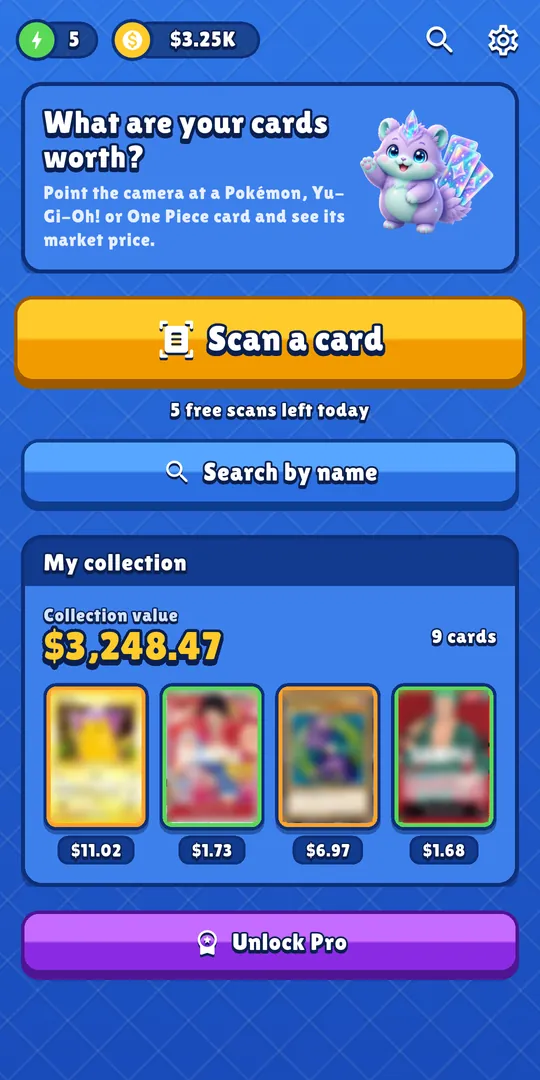
- Open Pullwise and tap Scan a card The home screen shows how many free scans you have left today. There is no account to create.
- Fill the frame Lay the card flat on a plain table, hold the phone parallel to it, and fit the whole card inside the scanner's frame. Before you press Scan, look at the small print: the number at the bottom of the card (under the art on Yu-Gi-Oh! cards) must be sharp. Hold still for a second so the focus settles.
- Watch the reveal Pullwise opens the card like a booster pack, then shows the price.
- Check the match Compare the name, set and number on the result sheet with the card in your hand. If it's the wrong card, tap Not this card. A wrong match doesn't use up a scan.
- Pick the finish Choose what you actually hold: normal, holo, reverse holo, 1st Edition or Unlimited for Pokémon; the set code and rarity for Yu-Gi-Oh!, with the cheapest reprint shown; regular print or parallel for One Piece. Prices are kept per print, so this choice changes the number you see.
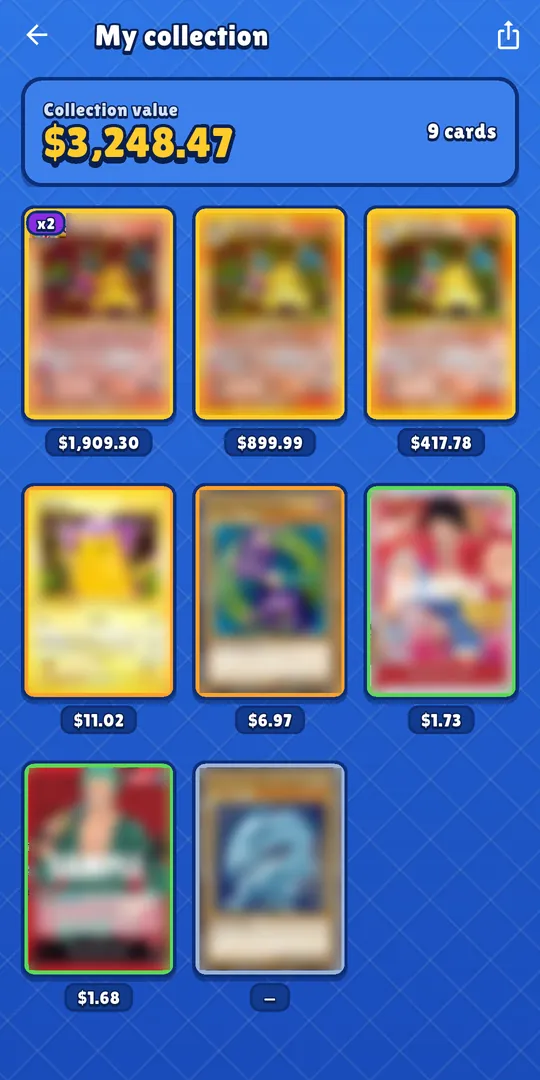
- Add it to your collection Tap Add to collection. The collection keeps a running total of everything you've added.
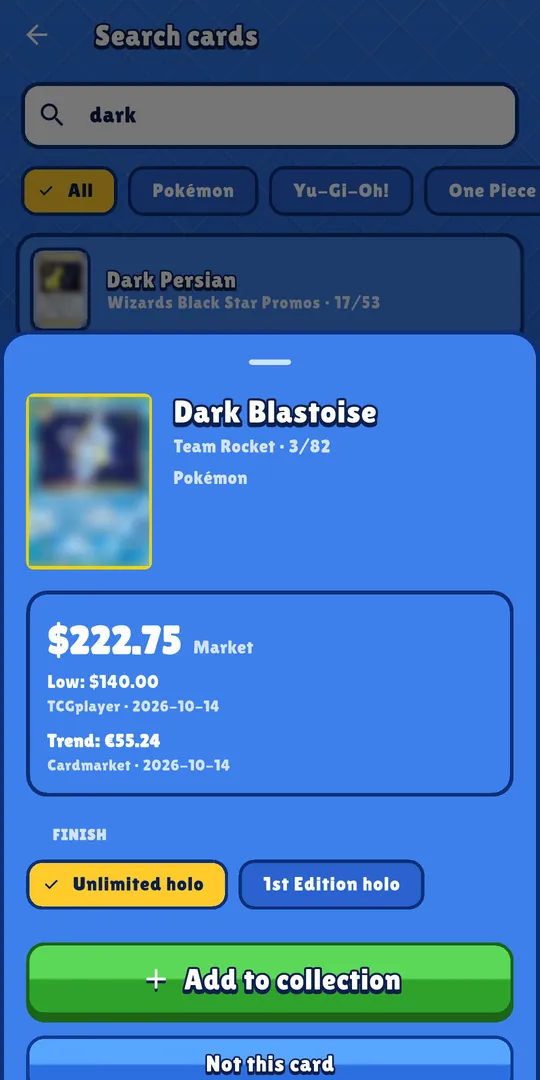
Here is step 3 as it looks in the app:
What must be readable on Pokémon, Yu-Gi-Oh! and One Piece cards
Each game prints its identifier in a different place. Know where to look before you aim the phone.
| Game | What must be sharp | Where it is | Looks like |
|---|---|---|---|
| Pokémon | Collector number | Small type in a bottom corner: bottom left on Scarlet & Violet cards, bottom right on older cards like Team Rocket | 025/198 |
| Yu-Gi-Oh! | Set code (card number) | Just under the artwork, on the right. Pendulum Monsters: bottom left. Link Monsters: a little left of the usual spot | LOB-EN001 |
| One Piece | Card number | Bottom right, next to the rarity | OP01-001 ST01-012 |
Pokémon: the collector number
The first number is the card's place in the set. The second is the advertised set size. A first number higher than the second marks a secret rare, so it isn't a misread. Reverse holos keep the regular card's number, which is why you pick the finish after the scan.
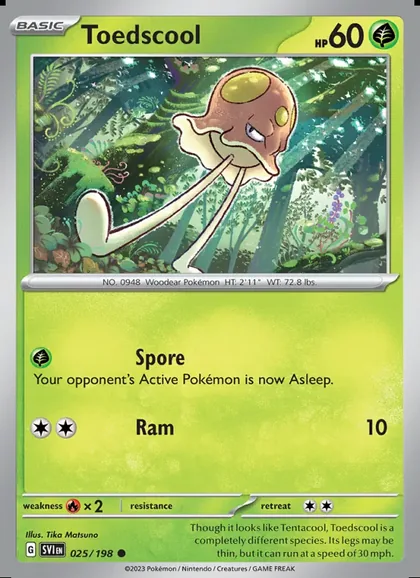 ToedscoolScarlet & Violet · 025/198 · common
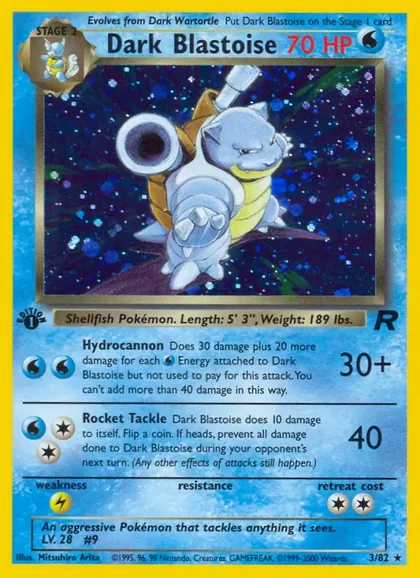 Dark BlastoiseTeam Rocket · 3/82 · 1st Edition holo

025/198 sits bottom left on the Scarlet & Violet card, 3/82 bottom right on the Team Rocket card. That strip is what has to be sharp. This Dark Blastoise also has the small 1st Edition stamp under the left corner of its artwork, which the number alone doesn't show. © Pokémon / Nintendo / Creatures / GAME FREAK · image via TCGdexYu-Gi-Oh!: the set code
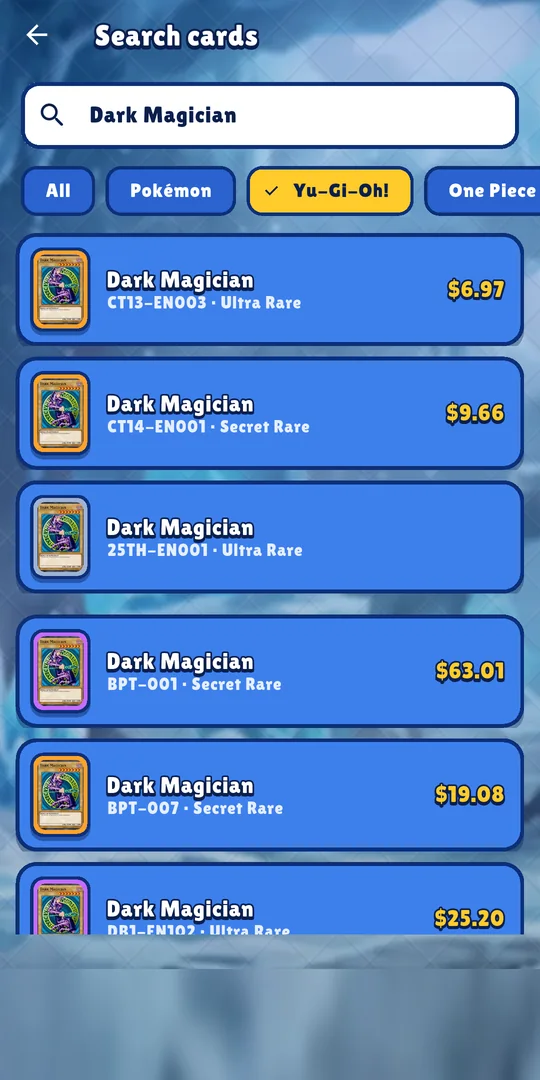
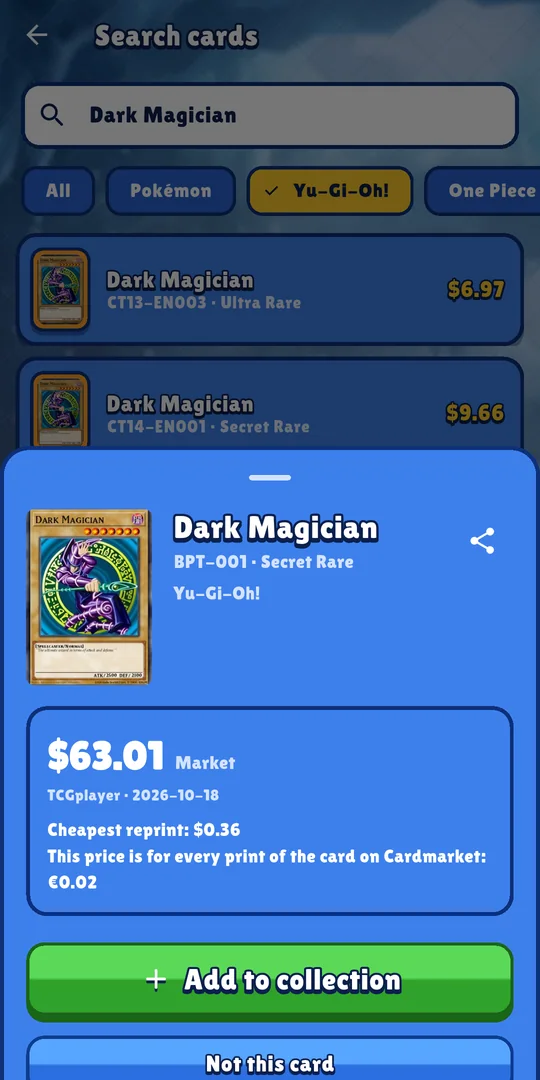
The code has three parts: the set prefix (LOB), the region letters (EN for worldwide English) and the card's position in the set (001). Some older codes have no region letters at all, like BPT-001 below. Because one card can appear at two rarities under the same code, the rarity choice on the result sheet matters. Our Yu-Gi-Oh! rarity guide shows how to tell them apart.
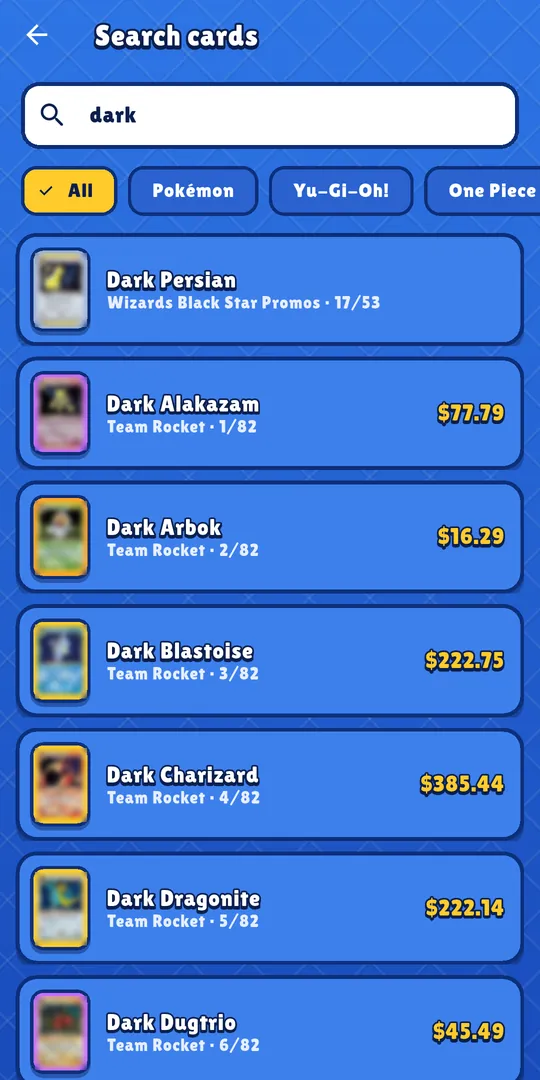
The set code is also where the money is. In the screenshots below, dated 2026-10-18, a search for Dark Magician lists each print by set code and rarity. The CT13-EN003 Ultra Rare shows $6.97 and the BPT-001 Secret Rare $63.01, while the result sheet puts the cheapest reprint at $0.36.
One Piece: the card number
The prefix names the product: OP01 is the Romance Dawn booster set and ST01 is the Straw Hat Crew starter deck. The three digits after the dash are the card's number in it. Parallel versions keep the regular card's number, as the two Shanks cards below show, so you pick regular or parallel after the match. The One Piece card rarity guide covers parallels and the rarity letters.
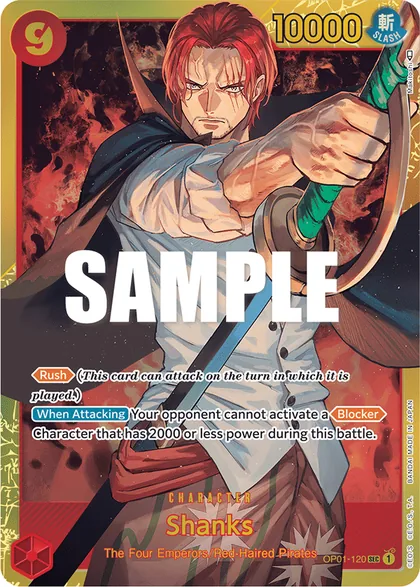 ShanksRomance Dawn · OP01-120 · SEC
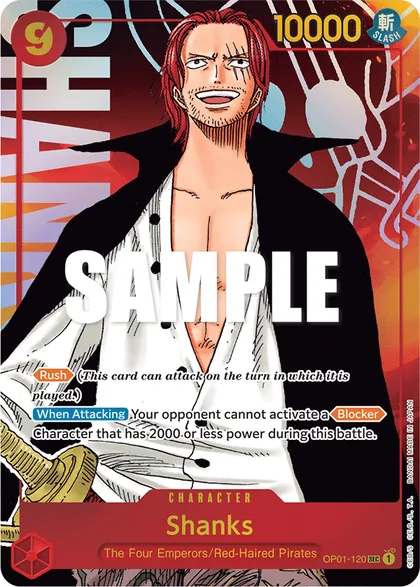 ShanksRomance Dawn · OP01-120 · SEC · parallel
OP01-120 SEC in the bottom right corner. The images come from the official card list, which stamps them SAMPLE. © Eiichiro Oda / Shueisha, Toei Animation · © Bandai · image via OPTCG APICamera habits that make scans work the first time
Light and focus decide whether the small print comes through. These habits take care of both.
- Light from the side, not from above. A glossy card acts like a weak mirror: light bounces off at the same angle it arrives. A ceiling lamp straight above the card, with your phone also straight above it, sends the reflection right into the lens. Sit beside a window, or move a desk lamp off to one side.
- Skip the flash. A small, bright light pointed straight at a shiny card makes a small, bright hot spot, usually right where you need to read.
- Hold the phone parallel to the card. At an angle, the far edge of the card drifts out of focus and the text gets squeezed.
- Don't get too close. Phone cameras can only focus down to a certain distance. If the number stays soft, back off a little instead of pushing closer. Samsung's own advice for blurry close-ups is to increase the distance slightly.
- Brace and hold still. In dim light the camera keeps the shutter open longer, and any movement during that time shows up as blur. Rest your elbows on the table, use both hands, and press Scan gently.
- Use a plain background. TCGplayer recommends a patternless surface in a color that contrasts with the card's border.
Tip: A sheet of printer paper on a table beside a window is a free scanning setup. Wipe the camera lens before a long session; one fingerprint softens every shot.
When a scan misses: glare, sleeves and wrong matches
If a scan doesn't find the card, work through the causes below before you try again, or search by name for free.
Glare on the number
A bright streak across the small print hides exactly the characters the scanner needs. Glare isn't fixed to the card. It moves when your viewpoint moves, which is how Google's PhotoScan app removes it from old photos. Tilt the card or the phone a few degrees until the streak slides off the number, then hold the phone parallel again. If it won't move, turn off the overhead light.
Scanning cards in sleeves and top-loaders
A sleeve adds another shiny layer between the card and the lens. If the number reads clean through the plastic, leave the card in. If a reflection sits on the number and tilting doesn't shift it, slide the card out for the scan. TCGplayer's scanning tips also ask for the card to sit centered in its sleeve, so the edges line up with the frame.
A top-loader is thicker plastic, and any scratches or haze on it sit right over the small print. Try a tilt first. If the number still isn't crisp, take the card out, scan it and put it back.
Other common misses
| Problem | Fix |
|---|---|
| Dim room | Add light from the side. Low light means a longer exposure, and a longer exposure means blur. |
| Blurry number | Back off a little, hold still, wipe the lens, press Scan gently. |
| Phone at an angle | Hold the phone parallel so the whole number is in focus and not squeezed. |
| Dark card border on a dark table | Dark scenes can trick the camera into a longer exposure. Put the card on something light and plain, like printer paper. |
| Thumb over the number | Lay the card flat instead of holding it, or hold it by the top edge. |
| Two or more cards in view | Scan one card at a time and fill the frame with it. A neighboring card can put a second number in the shot. |
Non-English Yu-Gi-Oh! cards
Pullwise matches Yu-Gi-Oh! cards by their English set code. European prints carry other region letters: DE for German, FR French, IT Italian, PT Portuguese and SP Spanish. Type the code into the free search with EN in place of those letters, so -DE012 becomes -EN012. On some of the oldest sets the prefix itself differs between languages; search the English card name instead. Either way, the price you see is for the English print, not your copy.
Right card, wrong version
If the name and number match but the price looks off, check the finish chip first and pick the version in your hand. If the card itself is wrong, tap Not this card. It costs no scan, and the free search is always there.
How to scan a binder or bulk lot
A shoebox of cards and 5 free scans a day can work together if you spend the scans where they count.
- Sort first. TCGplayer's guide for stores scanning stacks of singles calls sorting the cards beforehand, by set, rarity or condition, possibly the biggest time saver of the whole job.
- Scan the cards that might matter. Use scans on holos, cards with rare symbols, secret rares and anything that looks special. The Pokémon card rarity symbols chart helps you spot them fast.
- Search the rest for free. Search by name or code costs no scans and has no daily limit. For Yu-Gi-Oh!, type the set code. For Pokémon, type the name and match the set and number in the list.
- One card at a time. Take the card out of the binder page if the pocket throws glare, and keep its neighbors out of the frame.
- Need more scans? Watch a video for a bonus scan (up to 3 a day) or invite friends. Pro gives unlimited scans, an unlimited collection and CSV export.
Scanning cards to sell: what the price means and what it misses
A scan gives you the exact print and three prices, each with its date: the TCGplayer Market and Low prices in US dollars and the Cardmarket Trend in euros. TCGplayer says its Market Price is compiled from recent completed sales on its site. Pullwise rebuilds its prices daily from the public databases TCGdex, YGOPRODeck and OPTCG API. When a print has no price, the app says so instead of guessing.
Look at both markets before you set a selling price. In the result screenshot near the top of this guide, dated 2026-10-14, the Unlimited holo Dark Blastoise shows $222.75 Market and $140.00 Low on TCGplayer, but a €55.24 Trend on Cardmarket.
A scan can't see condition. Pullwise doesn't grade cards or judge whitening, scratches, bends or centering, and all of them change what a buyer will pay. A scan can't prove a card is genuine either: a counterfeit with the right number printed on it reads the same as the real thing.
So use the scan to get the right print and a starting price, then judge the card's condition yourself before you list it. For the full process, read how to check a Pokémon card's value, or scan your next card with Pullwise and compare.
Sources
- TCGplayer Help Center — What are the rarities of Pokémon TCG cards? (collector number format XXX/YYY; secret rares numbered above the set size; reverse holos keep the regular collector number; rarity symbol at the bottom right or left, black circle for common, black star for rare)
- TCGplayer Help Center — How do I identify card sets? (Yu-Gi-Oh! card number format SET-RN999, printed under the illustration; Pendulum Monsters in the bottom left)
- TCGplayer Help Center — Tips for Accurate Scanning (plain background that contrasts with the border; card centered in its sleeve; the app can miss the set when the same artwork was printed in several sets)
- TCGplayer Help Center — How to Setup and Use the TCGplayer App for Card Scanning (sorting cards by set, rarity or condition before scanning as a major time saver)
- TCGplayer Help Center — What do the different price points on TCGplayer.com mean? (Market Price is compiled from recent completed sales)
- Yugipedia — Card Number (position under the artwork, Pendulum and Link exceptions; prefix, region code and position number; region codes EN, DE, FR, IT, PT, SP; one card at different rarities may share a number; early North American English prints without region codes; LOB-EN001; prefixes that differ between languages in older sets)
- ONE PIECE CARD GAME official site — Card list (card numbers like OP17-001; BOOSTER PACK -ROMANCE DAWN- [OP-01] and STARTER DECK -Straw Hat Crew- [ST-01]; parallel versions listed under the same card number)
- CardGamer — One Piece Card Game's Devil Fruit symbol explained (set code, number and rarity printed at the bottom right of One Piece cards)
- Wikipedia — Specular reflection (the angle of reflection equals the angle of incidence on a smooth surface)
- Google Research — PhotoScan: Taking Glare-Free Pictures of Pictures (glossy prints and plastic album pages reflect light; glare changes position when the camera moves)
- Cambridge in Colour — Reducing Camera Shake with Hand-Held Photos (blur appears when the exposure is long relative to hand movement; better light, bracing and a gentle shutter press reduce it; dark subjects can trick the camera into a longer exposure)
- Samsung Support — Mastering close-up photography with your Galaxy phone (increase the distance slightly to reduce blur in close-ups)