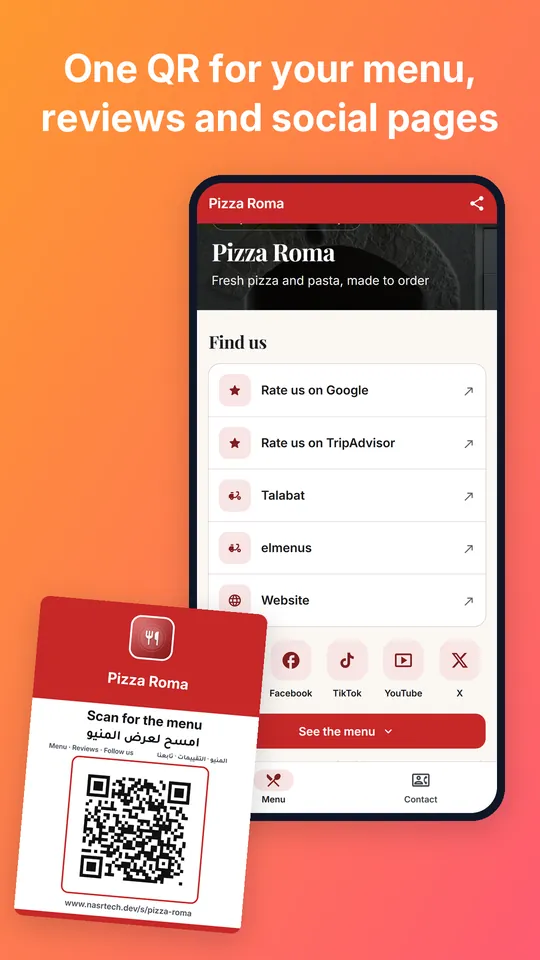
One QR code on every table for your menu, reviews and social pages.
Make a QR code menu for your restaurant or cafe in your browser. Customers scan it with their phone's camera and see your dishes with prices. Change a price later and the same QR shows the new one.
Make and preview free · publish from $4.99 a month
A page on their phone, with nothing to install.
Four steps in the web tool. A saved menu waits for you in the same browser.
Pick restaurant or cafe, type your name, then your dishes and prices.
Paste your review, social and delivery links. Leave empty what you don't have.
You get an address like www.nasrtech.dev/s/your-name and its QR code. This step needs a plan.
An A6 card with your name, the QR and a headline in English and Arabic. Print it or download the PNG.
The QR opens your address, not a copy of your menu. Change a price or add a dish in the tool, tap Update link, and every card on every table shows the new menu. Nothing to reprint.
Making your menu and the live preview are free. Putting it on a link comes with a plan.
$0
Make your menu and see it on the phone preview. Nothing is published.
$4.99 a month
Or $24.99 a year. One app, on a link without the badge.
$19.99 a month
Or $199.99 a year. For several apps.
A QR menu is your menu on a web page, opened by scanning a QR code on the table. Customers point their phone's camera at the code and the menu opens. It is also called a QR code menu, a QR code restaurant menu or a digital menu.
No. The QR opens a normal web page on any phone. There is nothing to install and no sign-in.
No. Change the price in the tool and tap Update link. The QR stays the same and shows the new price.
Yes, the way that suits you: from the waiter at the table, on WhatsApp if you add your number, or through your delivery apps. There is no card payment on the page.
Making and previewing are free. Publishing needs a plan: Starter at $4.99 a month or $24.99 a year for one app, or Premium at $19.99 a month or $199.99 a year for several.
Your page stays online at its address and the QR keeps working. It shows a small "Made with App Maker" badge, and updating it needs a plan again.
In the web tool you type your dishes and prices, and you can keep or remove the example photos. Your own photos go in through the Android app, Menu & Booking App Maker.
Yes. Start from the Arabic page and your menu reads right to left. The table card always carries its headline in English and Arabic.
Your working copy stays in the browser you made it in, so edit it there. The published page lives on our server. Sign in with Google to publish, and your plan follows your account.
The same QR menu is in our Android app, with your own photos, opening hours and a gallery.
