

I am a character animator. AnimKit is the set of Maya tools I wrote for my own work and then cleaned up enough to sell. This page is about why each part exists and what it does, including the parts I built wrong the first time and had to redo.
Disclosure, since it decides how you read the rest: this is my own product. I have tried to describe it the way I would describe someone else's tool, limits included.
What it is
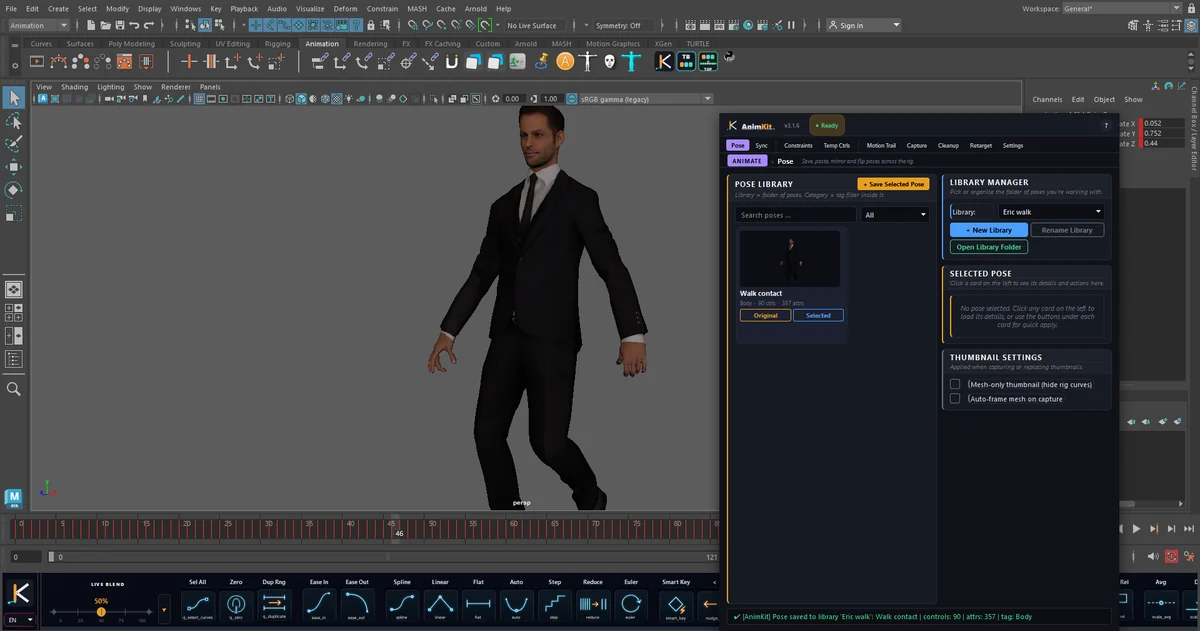
AnimKit is a panel with nine tabs and a toolbar that docks above or below Maya's time slider. The tabs are grouped as Animate (Pose, Sync), Rig (Constraints, Temp Ctrls) and Scene (Motion Trail, Capture, Cleanup, Retarget, Settings). It runs on Maya 2022 to 2026, on Windows.
The toolbar is the product
Most of what an animator does all day is small: set a breakdown, flatten a tangent, nudge a key one frame, mirror a hand. A tab you have to open is too far away for that, so the frequent operations are buttons on the toolbar and the tabs hold the things you do a few times a shot.

A few that are less obvious from their icons:
- Smart Key sets a key only on channels that are already animated and keeps their tangents, instead of keying everything.
- Dup Rng copies the highlighted range and pastes it straight after itself, extending the playback range. Press it repeatedly to lay down cycles.
- Reduce simplifies keys, but only keys selected in the Graph Editor or a range highlighted on the Time Slider. It refuses to run on whole curves, because that is how a reduce button ruins a shot.
- Copy Rel / Paste Rel memorise how one object sits relative to another and re-apply it later, on one frame or baked across a range.
Tween: the tab I threw away
The first version of the Tween tab had one slider, eight mode buttons and an Apply / Bake / Reset row. It looked complete and it was bad to use. Push read the key's current value on every tick of the drag, so each tick built on the last and the pose exploded after a few drags. The Default mode did the same thing as Blend. The Overshoot slider was not connected to anything. Reset snapped keys to the attribute default, which is 1 for scale and 0 for translate, so it usually threw the rig somewhere odd.
The rewrite is seven sliders, one per behaviour: Blend, Push / Pull, Overshoot, Smooth / Roughen, Default Pose, Blend to Neighbors and Blend to Ease. Each one records the keys' values when you press the mouse and computes from that record, so nothing accumulates and dragging back to the centre is the reset. The whole drag is one undo step.
Then the tab itself went. A full tab covered too much of the screen for something you use every few seconds, so the sliders now open as a small popup from the arrow beside the Live Blend slider. How this compares with the classic free tool is in Tween Machine and its alternatives.
Mirror: why "negate X" is not enough
The naive mirror is right = -left. It fails on real rigs for two reasons, and both are handled in the mirror engine.
First, controls do not rest at zero. A foot IK control can rest at translate X 85.7 on the left with its right-side twin resting at -95.43. Negating puts the right foot at -85.7, almost ten units off its rest position while the left foot has not moved. The mirror works from each control's default instead: the right control is moved the same distance from its rest value that the left one is from its own.
Second, left and right controls are not always built with mirrored axes, so which channels need their sign flipped differs per pair. The engine measures each pair's axes when you click, the same idea Studio Library uses for its mirror tables. Custom attributes such as a foot roll are copied, never negated.
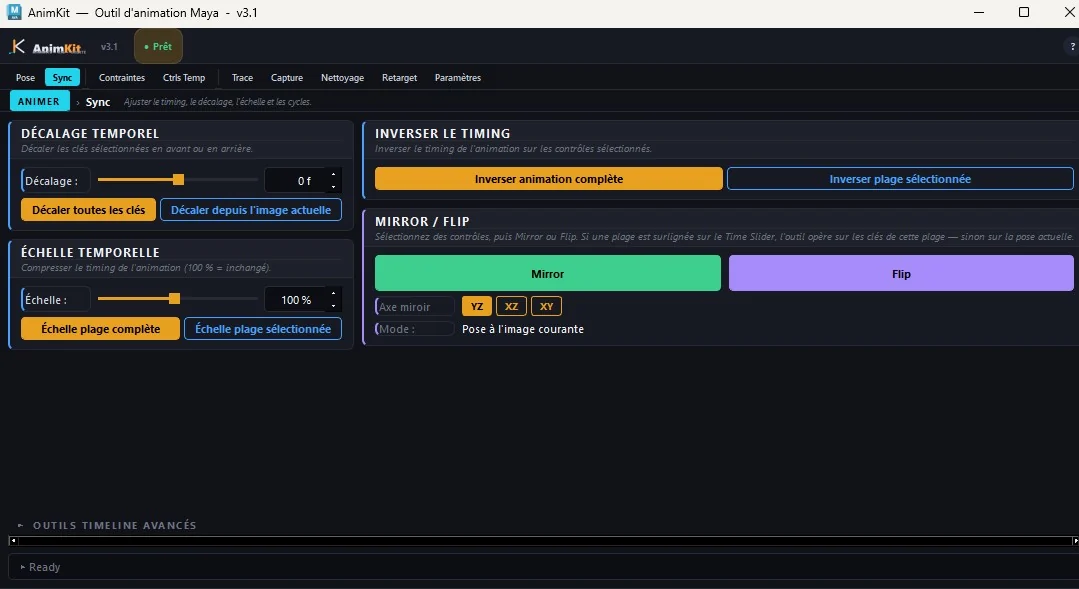
Mirror used to be its own tab, and the Pose tab had a second copy of the controls. People read the copy as "mirror the saved pose", which it never did, so the controls were removed from the Pose tab and the tab was folded into Sync. The background is in how to mirror a pose in Maya.
Props without leftover constraints
There was a tab called Fake Link for attaching a prop to a hand with a constraint, a weight and a bake. It worked and it left constraint nodes in the scene. It has been replaced by Copy Rel and Paste Rel on the toolbar, which store the offset in memory and write keys, with nothing left behind. The Constraints tab is still there for the cases that need a real constraint and a keyed switch; attaching a prop to a hand explains when that is.
Mixamo retarget: reading the rig, not the names
The Retarget tab puts a Mixamo clip onto your own rig's controls. Its first engine matched controls by name, and failed on rigs that named things differently: lowercase, prefixed, referenced. The current engine reads the rig instead. It looks at the skinned joints, their symmetry, and which control actually drives each joint, and uses names only as hints. Scan Scene shows every joint-to-control pair before anything is baked, and locked controls are skipped and listed. The release notes for 3.1.6 record it as tested on 27 rigs.
The manual way to do the same job with HumanIK is written up in Mixamo to Maya.
Cleanup with a scope
The Cleanup tab runs Maya's own filters as a checklist: remove static curves, Euler filter, remove redundant keys, snap keys to frames, fix infinity, clean namespaces, delete unknown nodes. The change that mattered was adding a scope. It defaults to Selected only, a selection with no animation changes nothing, and the two scene-wide operations are off unless you choose Whole scene. A cleanup tool should not be able to surprise you. The manual equivalents are in how to clean up animation curves.
Three interface languages
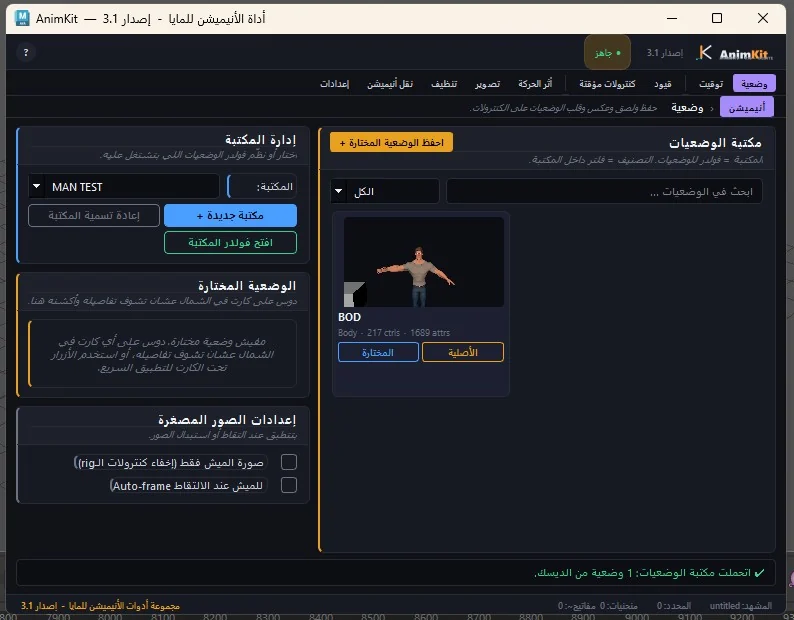
The interface is in English, Arabic and French, switched from the toolbar. Arabic is laid out right to left. Arabic is my first language, and a tool I have open all day should be readable in it.
What it does not do
- It is Windows only. On macOS or Linux, look at the tools in the roundup of Maya animation plugins.
- It does not import Studio Library files. The pose library uses its own format; see Studio Library alternatives for what that means in practice.
- The speed-coloured motion trail is sampled when you create it. Maya 2025 has a built-in Velocity mode that updates live; details in the motion trail guide.
- It is smaller than animBot. If you rely on animBot's deeper tools every day, this does not replace them. The free animBot alternative article covers where each option fits.
- There is no free trial. There is a monthly plan and a 30-day money-back guarantee.
Prices, checked on 1 October 2026: $9 a month, $39 a year, or $79 once. Details and the walkthrough videos are on the AnimKit page.