

Most searches for a Studio Library alternative start from a specific annoyance: a pose that loads onto nothing, a mirror that flips the wrong way, or a library that needs to work for a whole team. Some of those are fixed inside Studio Library in two minutes. A few are real limits. This page goes through what the tool does, how to set it up properly, where it stops, and which alternative fits which gap.
One correction first, because an earlier version of this page had it wrong: Studio Library does mirror poses and animation. It does it through mirror tables, which are covered below.
What Studio Library does
Studio Library is a free pose and animation library for Maya by Kurt Rathjen, released under the LGPL v3 and developed in the open on GitHub. Its feature list, from the project's own README:
- Save poses and animation
- Mirror poses and animation
- Create selection sets
- Middle-mouse drag on an item to blend toward a pose
- Drag and drop to organise items into folders
- Insert, merge and replace animation
It runs on Windows, macOS and Linux. The site lists version 2.21.7 as supporting Maya 2023 to 2027 (checked on 1 October 2026), and there is now a paid Pro edition next to the free one; the site describes the free version as perpetually supported.
Everything you save is a file in a folder you choose: .pose for poses, .anim for animation, .mirror for mirror tables, .set for selection sets. That design is why a library can sit on a network drive and be shared by a team.
Set it up
- Download the zip from the site or the GitHub releases page and unzip it.
- Drag
studiolibrary/install.pyonto the Maya viewport. - Click the Studio Library icon that appears on the shelf, and pick the folder that will hold the library.
- Make one folder per character. Poses store control names, so mixing rigs in one folder gets confusing fast.
Save and apply a pose
- Select the controls the pose should include. A hand pose needs the finger controls only; a full-body pose needs everything.
- Create a new Pose item, give it a name, capture the thumbnail from the viewport and save.
- To use it, select the item and apply it. Middle-mouse dragging on the item blends from the current pose toward the saved one, which is the fastest way to get "70% of that hand pose".
- Turn on the key option when applying if you want the result keyed.
A pose applies to the controls it was saved from. If nothing is selected it applies to all of them; with a selection, only to the selected ones.
Mirror with a mirror table
A mirror table tells Studio Library which control is the left twin of which right control and how each pair's axes relate.
- Put the rig in its default pose.
- Select all of the character's controls.
- Create a new Mirror Table item in the character's folder. Enter how your rig marks its sides, for example
LfandRf, or_Land_R, and save. - From then on, apply a pose with the mirror option on to get it on the other side, or apply the mirror table itself to mirror or swap what is currently in the scene, including animation.
The author's own walkthrough is on the site under "How to use mirror tables".
The two failures people hit
The pose applies to nothing. The pose was saved from a character in one namespace, say heroA:, and the scene now has heroB: or no namespace at all. Studio Library has a namespace option when applying; set it to use the namespace of your current selection, select one control on the target character, and apply again.
The mirror is wrong on some controls. Either the side naming entered in the table does not match the rig (a table built for _L/_R finds no pairs on a rig that uses Left/Right), or the table was created while the rig was posed. The table measures how each pair's axes relate at the moment you create it. Delete it, return the rig to its default pose, and create it again.
Where it stops
- Mirroring needs a table per rig. It is a one-time setup, but it is setup, and a new rig or a renamed control means a new table.
- It is a library, not a toolkit. Tweening, curve cleanup, retargeting and the like are other tools' jobs.
- Team features are in Pro. Versioning, multiple projects, batch saving and tagging are listed under the paid edition.
For most animators none of these is a reason to leave. Studio Library is free, maintained and the closest thing Maya has to a standard pose library.
Alternatives, by what you are missing
| You want | Look at |
|---|---|
| A team library with versioning and tags | Studio Library Pro, from the same author |
| Mirroring without building a table first | A mirror tool that detects pairs on each click, such as the one in AnimKit below, or the method in how to mirror a pose in Maya |
| To move a pose or animation to a different rig | That is retargeting, not a library job: see copying animation between rigs |
| A pose library inside a wider animation toolkit | AnimKit, described next |
One thing that is not an alternative: Maya's own Pose Editor. It manages corrective shapes for deformation, not saved poses of a character's controls.
One option: the Pose tab in AnimKit
Disclosure: AnimKit is my own paid Maya toolkit. Its pose library was modelled on the Studio Library workflow, and its mirror uses the same idea of measuring each control pair's axes.
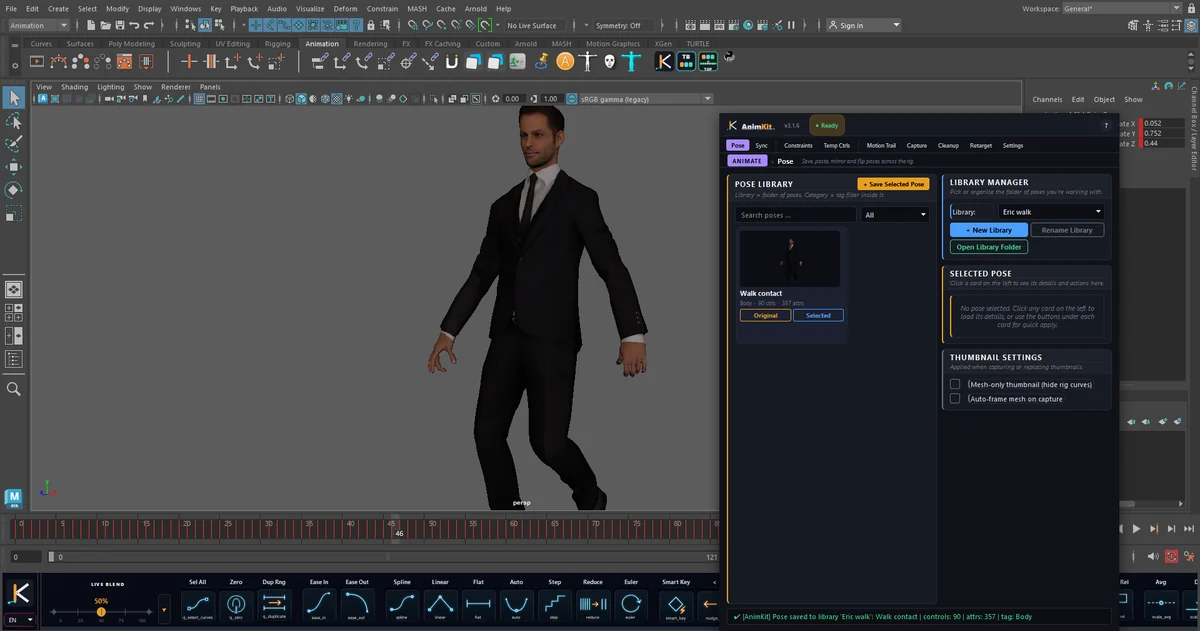
What the Pose tab does:
- Save Selected Pose stores the selected controls' values with a viewport thumbnail and a tag (Body, Face, Hand or Custom).
- Each card has two buttons. Original applies the pose to the controls it was saved from. Selected applies it to whatever you have selected now, matched in order, which is how you put a left-hand pose on a different character's hand.
- Search, a tag filter, and separate libraries per character or project.
- Right-click a card to rename it, update it from the current selection, replace the thumbnail, or select the controls it contains.
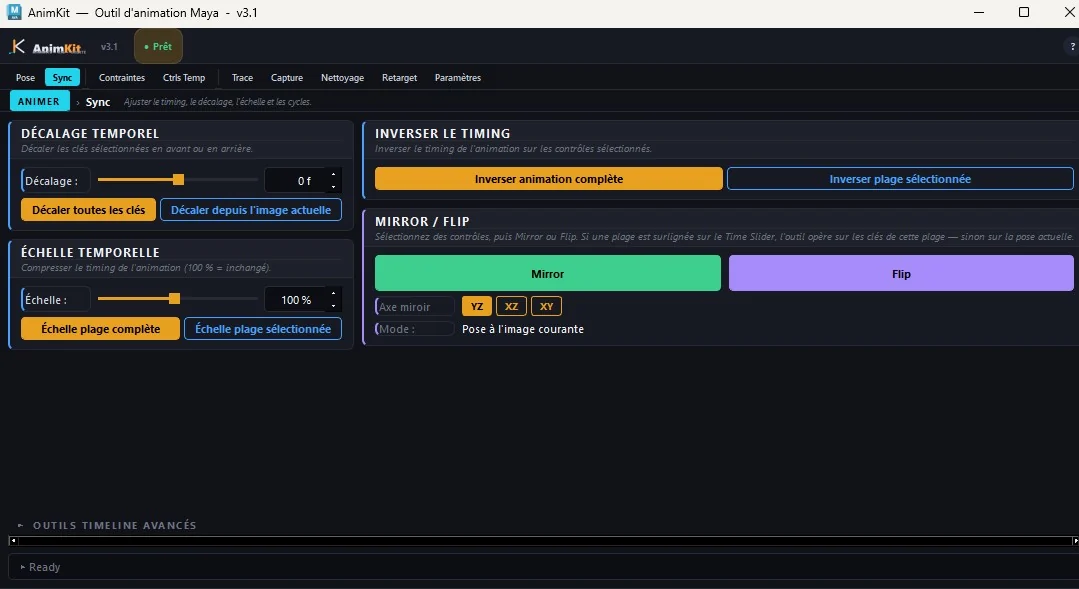
Mirroring is a separate tool and needs no table. Select controls and click Mirror or Flip on the toolbar or in the Sync tab. The partner is found from the control's name on each click, the axes are measured per pair, and if a range is highlighted on the Time Slider the keys in that range are mirrored instead of the current pose.
What it does not do, so you can decide quickly:
- It does not read Studio Library files. AnimKit keeps its own library format. An existing
.posecollection has to be re-saved pose by pose. - Poses only. There is no saved-animation item and no blend-toward-pose drag; a pose is applied at full value.
- Libraries are stored per user, in Maya's user folder, not designed as a shared network library.
- Windows only, Maya 2022 to 2026, $9 a month, $39 a year or $79 once (checked on 1 October 2026), no free trial.
If a pose library is all you need, stay with Studio Library. AnimKit makes sense when you want the library, table-free mirroring and the rest of the toolbar in one install, and you are on Windows.