

Base44 can make the Google Play file for you. Click Publish, open the Mobile app tab, choose Build Stores Files, then Create Google Play files, and Base44 generates an Android App Bundle that wraps your published app. To download it, Base44's docs say you need the Builder plan or higher, which costs $50 a month, or $40 a month billed yearly (Base44 docs and pricing, both read 10 Oct 2026).
The other route is to wrap your base44.app address with a website-to-app builder. We tested it on Base44's own Fitness Studio template, fitness-studio.base44.app: a free test APK in 8 seconds, installed and running on an Android 15 emulator. This guide puts both routes side by side, with the steps, the costs and what each one can't do.
Disclosure: NasrTech makes Nasr App Maker, the tool used in this test. Base44 is a trademark of its owner. NasrTech isn't affiliated with Base44, and the Fitness Studio template is Base44's public demo, used here as an example.
Route 1: Base44's built-in Google Play files
Base44 added App Store and Google Play publishing in early 2026 (Tech.co, 9 Feb 2026). Its documentation describes what you get:
- An AAB file that runs your published Base44 app inside a web view and opens only your app's URL.
- An app ID set by Base44, in the form
com.base[app-id].app, built from the ID in your editor URL. Base44 also "automatically configures a Bundle ID and signing key". The docs don't say whether you can download that key. - Google sign-in that works once you paste the SHA-256 fingerprint from Play Console into Add Google Play SHA.
- Push notifications with your own Firebase project: you upload
google-services.jsonand a service account key. - A free scan against Google Play's guidelines, available on the Free plan.
The same page lists the limits: no full offline mode, no Stripe for digital goods inside the app, no RevenueCat, no way to add the billing permission, and device permissions that Base44's AI sets for you. Base44 doesn't submit the app or follow the review for you.
Route 2: wrap your base44.app site (tested)
1. Read the site
We typed fitness-studio.base44.app into the website to APK builder. Base44 sends its menu links in the page's HTML, so the reader picked up Class Schedule and Pricing for the bottom bar and offered Instructors, Privacy Policy, Accessibility and Terms as extra tabs. A Lovable site gives the reader nothing to work with here; see our Lovable test for the difference.
The phone preview showed a sketch instead of the live site. Base44 sends X-Frame-Options: DENY, which stops browsers from showing the page inside another page. That rule applies to frames on web pages, not to Android apps, and the installed app showed the full site.
2. Make it yours, then run the free Google Play check
We renamed the app to Aura Fitness Studio, set the colour from the site, and shortened the tab names to Classes and Pricing. The suggested app ID was app.base44.fitnessstudio.app. Change it to your own reversed domain under App ID (package name) before you build, because Google Play never lets you change it after the first upload.
The template has no phone, email or WhatsApp on it, so the contact page had a single Website button. The free check flagged it before any payment:
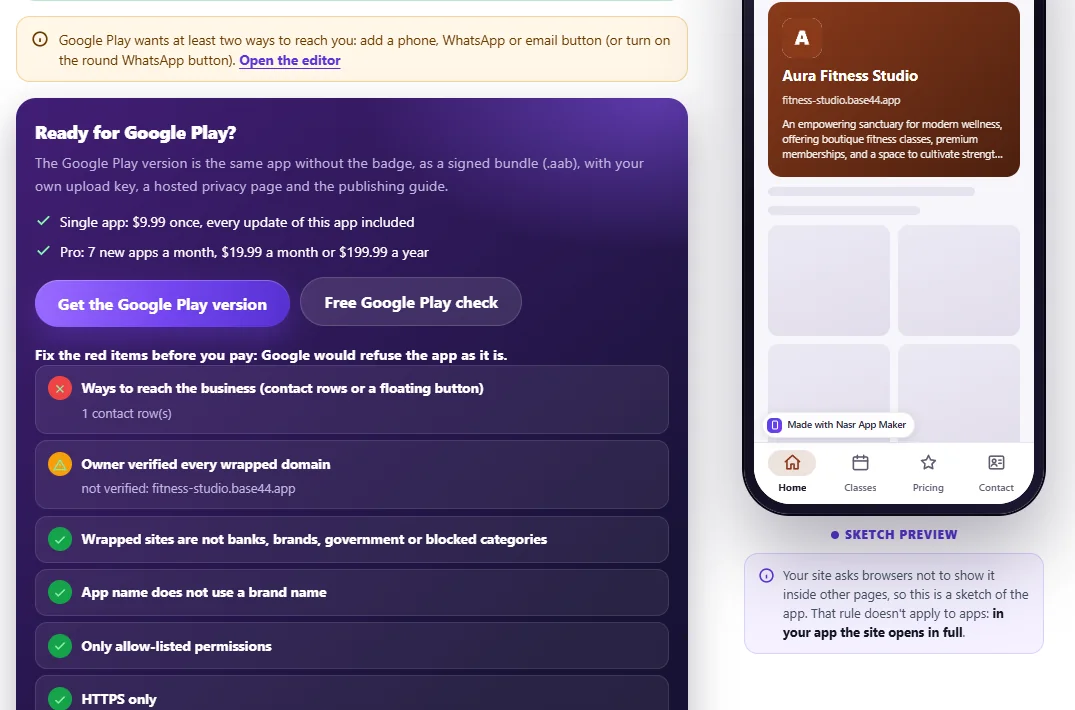
Add a second way to reach you, like an email address or a phone number, and the red item clears. The domain warning stays a warning. You can't add a DNS record to a shared base44.app address, so if Google asks you to prove the site is yours, a custom domain makes that easier. Base44 includes "Connect a domain" from its Starter plan ($20 a month).
3. Build the test APK and install it
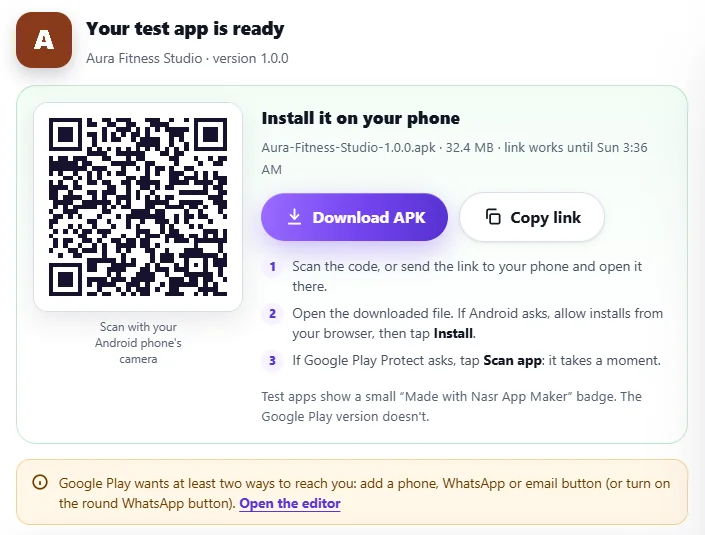
The free build returned a 32.4 MB APK and a QR code. On the emulator, each tab opened its Base44 page, the native app bar named the page, and the Contact tab showed our button list.
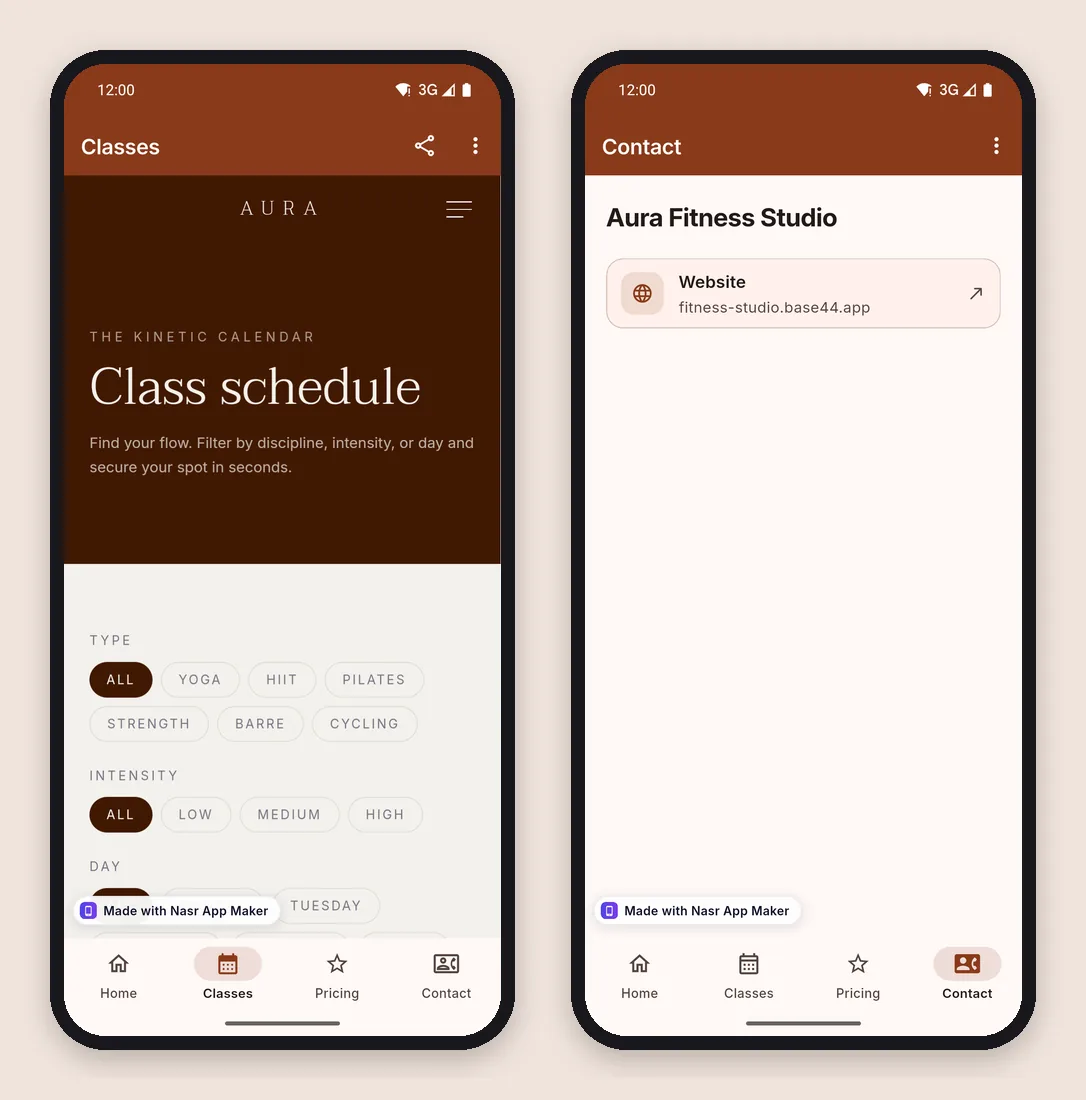
Side by side
| Base44 built-in files | Nasr App Maker (web) | |
|---|---|---|
| Price | Builder plan, $50/month or $40/month yearly, to download the files | $9.99 once per app; preview and 3 test APKs a month free |
| Test on your phone first | The scan is free; the file download needs Builder | Free test APK with a QR code |
| App ID | com.base[app-id].app, set by Base44 | Yours to choose |
| Upload key | Configured by Base44; export not documented | Made for the app; export as a .p12 with its password |
| Google sign-in | Works after you add the SHA-256 fingerprint | Opens in the browser; email and password stay in the app |
| Push notifications | Yes, with your own Firebase project | Not in the web plans |
| Bottom bar and native pages | Not described in the docs | Up to five tabs, a native contact page, an offline screen |
| Pre-submission check | Scan against Google Play guidelines | Free Google Play check for the common website-app rejections |
Both routes need your own Google Play developer account, a one-time $25 fee (Play Console Help). A third option, Median, starts at $229 plus $179 a year from the second year.
Sign-in, payments and offline in a wrapped Base44 app
Base44 apps put their login page on your own address. On a budgeting template from Base44's template gallery, Sign in went to /login?from_url=… on the app's own base44.app domain. That page stays inside our app, so email and password sign-in works and the session stays put.
The social buttons leave your domain. Continue with Google went straight to accounts.google.com, with app.base44.com/api/apps/auth/callback as the return address. Google refuses its sign-in page inside embedded WebViews (Google OAuth 2.0 Policies, error disallowed_useragent), so our app opens it in the browser, and the session lands there. Microsoft, Facebook and Apple buttons also open outside. If most of your users sign in with Google, that alone is a reason to stay with Base44's built-in files.
Payments follow Google's Payments policy on either route: physical goods and services can use Stripe, digital goods sold inside the app need Google Play's billing. Our wrapper can't take Google Play payments, and Base44's docs say its editor can't add the billing permission either. When the connection drops, our app shows its own offline screen and reloads by itself; Base44's docs say full offline mode isn't supported on theirs.
Which route should you pick?
- Stay with Base44's files if you already pay for Builder, your users sign in with Google, or you need push notifications now.
- Wrap the site if you're on the Free or Starter plan, you want your own app ID and a copy of your upload key, or you want to see the app on your phone before you pay anything. With several Base44 sites, Pro is $19.99 a month or $199.99 a year for seven new apps a month.
Pick one route per app. The two produce different app IDs, so a Play listing made with one can't take updates from the other.
The Google Play steps are the same either way
- Create the developer account and pay the $25 fee.
- On a personal account created after 13 November 2023, run a closed test with 12 testers for 14 days in a row (Play Console Help).
- Publish a privacy policy. The privacy policy generator guide covers what to put in it, and do you need a privacy policy for your app explains when Google asks for one.
- Fill in the Data safety form for the data your Base44 app collects. See Google Play Data safety explained.
- Prepare the listing images: a 512 px icon and screenshots in Play's sizes.
Google reviews every app itself. A wrapped site needs more than one page and a native screen to pass the minimum functionality rule, which is why our tool always adds a native contact tab.
Frequently asked questions
Can I publish a Base44 app to Google Play on the free plan?
You can run Base44's store scan for free, but downloading Base44's Google Play files needs Builder or higher. Wrapping the site works from any Base44 plan, since it only needs the published address.
Does a wrapped Base44 app update when I change the app in Base44?
Yes. The app loads your live site. Publish the change in Base44 and the app shows it on the next launch. You rebuild only to change the app's own name, icon, colour, tabs or contact buttons.
Can I move from Base44's AAB to a wrapped app later?
Not on the same listing. Google Play ties a listing to one app ID, and Base44's com.base… ID differs from the one you choose in our tool. You would publish a new listing.
Is there an iOS version?
Not from our tool: Nasr App Maker builds Android apps only, on the web and in its Android app on Google Play. Base44's built-in route also makes App Store files.
The bottom line
Base44's own Google Play files are the better fit when you pay for Builder anyway and need Google sign-in or push. If you're on a cheaper plan, the Base44 to APK route gets the same site onto Google Play for $9.99 once, with an app ID you choose and an upload key you keep. Build the free test APK first, fix what the free check flags, and only then pay for the Google Play version.