

Say you're blocking a shot. You set a pose, scrub two frames forward, set the next, then spend a minute nudging tangents so the in-between doesn't pop. Now multiply that by every control, every frame, every shot in the week. That repetition is what Maya animation plugins remove. They don't animate for you. They cut the clicks between you and the pose in your head.
There are only a handful of tools most Maya animators actually reach for. Here's what each one does, what it costs, and who it's for — including my own tool, so you can weigh it honestly.
The short version
| Tool | Price | Runs on | Still developed? |
|---|---|---|---|
| animBot | $144 a year (Pro); other plans from $60 a year | Windows, macOS, Linux | Yes |
| Studio Library | Free; a paid Pro edition exists | Windows, macOS, Linux | Yes |
| Tween Machine | Free | Windows, macOS, Linux | Yes, Python 3 version for Maya 2022 and later |
| TheKeyMachine | Free, GPL-3.0 | Windows, macOS, Linux | No. Development ended; Maya 2022 to 2025 |
| aTools | Free | Older Maya versions | No. Retired in favour of animBot |
| AnimKit | $9 a month, $39 a year or $79 once | Windows only | Yes |
Prices and status were checked on each tool's own page on 1 October 2026.
What an animation plugin actually saves you
Stock Maya can do all of this. The plugins just make it fast:
- Tweening / breakdowns — drag a slider to place an in-between between two poses instead of hand-keying it.
- Pose and animation libraries — save a pose once, apply or mirror it on any character later.
- Tangent and curve cleanup — fix popping and floaty curves without opening the Graph Editor for every control.
- Temp pivots and controls — rotate from a different point for one move without touching the rig.
- Marking menus / hotkeys — reach the tool you want in one gesture instead of hunting through shelves.
Most animators end up with two or three of these running at once.
animBot — the polished paid standard
animBot is the tool most studios and freelancers compare everything else to. It bundles tweening, tangent tools, temp pivots, workspace shortcuts and a lot more behind a clean marking menu. It's well maintained and it feels finished.
The catch is the model: it's a paid subscription, so the cost keeps recurring for as long as you use it. Its pricing page lists Pro at $144 a year, an Eco plan at $60 a year limited to older bundled versions, a $6-a-week Freelancer plan, and a $249 Lifetime edition frozen at version 1.0.x and marked compatible up to Maya 2020. There is a free 30-day trial. If you animate full time and want the most complete polished toolset, it's the safe default.
Best for: full-time animators who want the market standard and don't mind a subscription.
Studio Library — the free pose and animation library
Studio Library is a free, open-source tool for saving and loading poses and animation in Maya. Save a pose, blend toward it with a middle-mouse drag, and mirror it to the other side once you have saved a mirror table for the rig. If your work is character-heavy, it pays for itself in reused poses alone.
It does one job and does it well. It is not a general animation toolbox — you'll still want a tweener and cleanup tools alongside it.
Best for: anyone who reuses poses and wants a free, proven library. Setup, mirror tables and the usual namespace problem are covered in the Studio Library alternatives guide.
Tween Machine — the free classic for breakdowns
Tween Machine is one of the oldest free Maya scripts still in use. It gives you a single slider to create a breakdown between the previous and next key — favoring one pose or splitting the difference — plus an overshoot option that lets the slider go past either pose.
It is tweening only, and it is maintained: the current developer released a Python 3 version for Maya 2022 and later. Install steps and its limits are in the Tween Machine write-up.
Best for: animators who want free, no-friction breakdowns and nothing else.
TheKeyMachine — free, open-source, no longer developed
TheKeyMachine is a free GPL-3.0 toolset with temp pivots, isolate, snapping, copy and paste of animation, and curve tools. Its developer has ended development: the code stays on GitHub, but there are no further updates and the documented Maya support stops at 2025.
Best for: students and hobbyists on Maya 2025 or earlier, and anyone on macOS or Linux who needs a free toolset. The details are in is there a free animBot alternative and animBot vs TheKeyMachine.
aTools — the free legacy toolbox
aTools was a popular free animation toolbox for years, with tweening, motion trails and cleanup in one shelf. Plenty of animators still have it installed.
Be aware of one thing: it's no longer actively supported, and its author moved on to build animBot. It can still work, but on newer Maya versions you may hit compatibility gaps and no fixes are coming. Treat it as a legacy option, not a long-term bet.
Best for: animators already using it who don't want to change, on a Maya version where it still runs.
AnimKit — the affordable all-in-one
Full disclosure: AnimKit is my own tool, so read this section with that in mind.
I built AnimKit as a lower-priced toolkit for everyday animation work: a toolbar with a live tween slider, tangent buttons, key reduction, mirror and flip, plus tabs for a thumbnail pose library, timing, constraints, temp controls, a motion trail that can colour by spacing, playblast capture, scene cleanup and Mixamo retargeting. The UI ships in English, Arabic and French, and it runs on Maya 2022–2026.
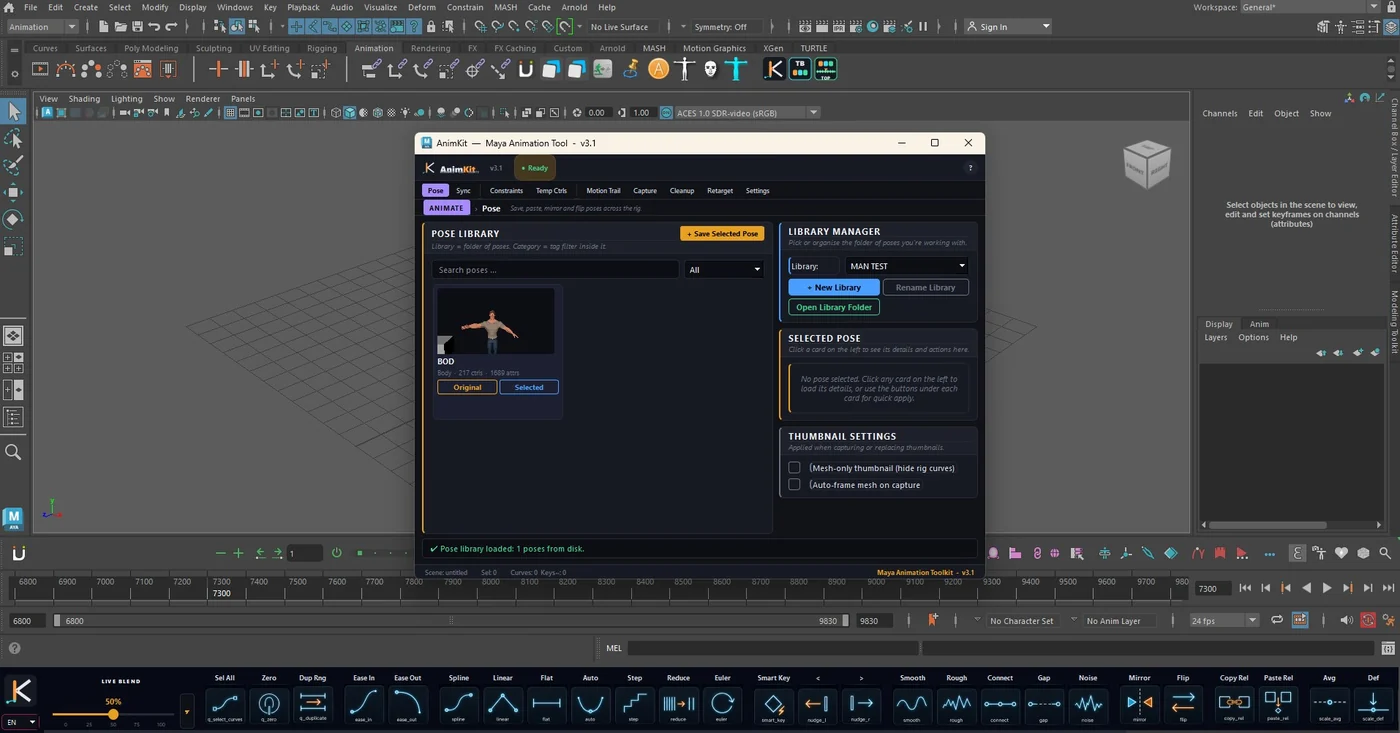
The honest tradeoffs: it runs on Windows only. It's newer and smaller than animBot, so it has a shorter track record and a smaller community. Its pose library uses its own format and does not import Studio Library files. What you get in return is a one-time price option and one install instead of three. The longer account of what is inside is in why I built AnimKit, with focused pieces on the Maya motion trail and Mixamo-to-Maya retargeting.
Best for: animators on Windows who want the day-to-day tools without a recurring bill.
How to choose
Pick by budget and by what you actually repeat:
- You want the most complete, most polished toolset and a subscription is fine → animBot.
- You mainly reuse poses → Studio Library (free), plus a tweener.
- You just want free breakdowns → Tween Machine.
- You animate on macOS or Linux → animBot if you can pay, Studio Library and Tween Machine if you can't.
- You want a full toolbox on Windows without a subscription → AnimKit, paid once.
- You're fixing floaty curves more than anything → whatever you pick, pair it with good habits; the guide on cleaning animation curves in Maya helps.
There's no single best plugin. There's the one that removes the clicks you make most. Start with the free tools if you're unsure: Studio Library and Tween Machine cost nothing to try, and they will show you which clicks you still want gone.