

You block a great pose on the character's left side, hit mirror, and the right arm folds into the chest with the wrist rotated the wrong way. You undo, try a different mirror option, and get a different kind of wrong. Anyone who has animated on more than one rig has had this afternoon.
The frustrating part is that mirroring a pose is conceptually trivial — flip the values across an axis — and yet it fails constantly in practice. The reason is almost never the pose. It is the rig.
Why a "global mirror" breaks
Most simple mirror tools assume every control behaves the same way: negate the X translation, negate two of the rotations, done. That assumption holds only when the rigger built the left and right controls as clean mirrors of each other, with matching rotation orders and predictable joint orients.
Real rigs drift from that ideal constantly:
- Non-standard joint orients. A wrist or foot control whose local axes point somewhere unexpected will mirror onto the wrong axis.
- Mismatched rotation orders. If the left control is XYZ and the right is ZXY, negating the same channels produces a different rotation.
- Behavior vs orientation mirroring. The names come from Maya itself: Skeleton → Mirror Joints has a Mirror function option with exactly those two choices. With Behavior, the mirrored side's local axes are flipped so the same rotation values produce a mirrored pose. With Orientation, the axes keep their direction and the values have to be negated. The same mirror math cannot serve both.
- Controls that should not flip at all. A root, a head-look, or a prop control often needs to stay put while everything else mirrors.
This is why a mirror that works perfectly on one production's rig can be useless on the next one.
Three things a correct mirror has to get right
It works from the rest pose, not from zero. Controls do not always rest at zero. A left foot IK control can rest at translate X 85.7 while its right-side twin rests at -95.43. Negating the left value puts the right foot at -85.7, almost ten units away from its own rest position, although the left foot has not moved at all. The correct move is relative: take how far the left control is from its own rest value and move the right control the same distance from its rest value.
It decides the sign per control pair. Which channels flip depends on how that pair of controls was built, as above. An FK arm built by mirroring the joint chain usually needs its rotations copied unchanged. An IK hand usually needs only the translate channel that crosses the mirror plane negated.
It leaves custom attributes alone. A foot roll of 30 should be 30 on the other foot. Finger curls, IK/FK blends and similar attributes are copied, never negated.
The manual method (and why it wears you down)
Without a tool, the reliable approach is per-control and tedious:
- Select a control on the source side. In the Channel Box, note or copy its channel values.
- Select the matching control on the other side and enter the values.
- Negate whichever channels that specific control needs: often translate X plus two rotation channels, but not always. Work out the rule on one frame by trying it and looking.
- Check the result in the viewport from the front, fix what flipped wrong, and repeat for every control in the pose.
For a full-body pose across a couple of dozen controls, this is the difference between a two-minute idea and a twenty-minute chore.
The free route: a Studio Library mirror table
Studio Library solves the per-pair problem with a mirror table. You put the rig in its default pose, select all the controls, create a Mirror Table item and tell it how the rig marks left and right. The table records how each pair's axes relate. After that you can mirror or swap the current pose, or apply a saved pose mirrored. It is free, and for most rigs it is the first thing to try. Setup and the usual failure are in the Studio Library guide.
One paid option: mirror and flip in AnimKit
Disclosure: AnimKit is my own Maya toolkit.
Its mirror does the three things above without a table. You select controls and click Mirror or Flip; the partner is found from the control's name on each click, the axes are measured for that pair, values are taken relative to each control's default, and custom attributes are copied as they are.
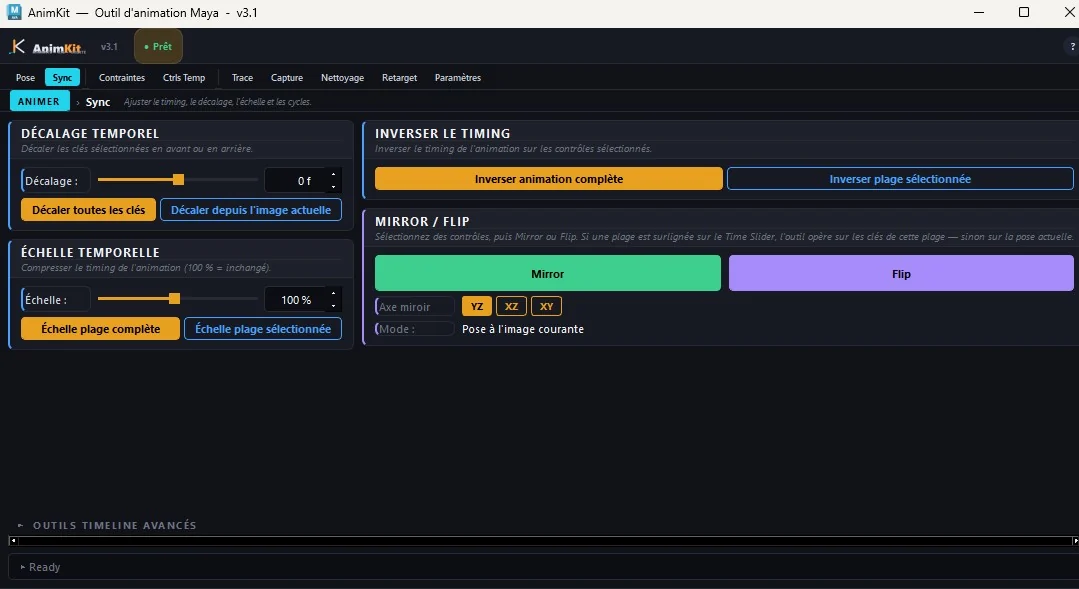
Two details worth knowing:
- Mirror and Flip are different operations. Mirror copies the selected side's pose onto its partner and leaves the source alone. Flip swaps the two sides.
- A highlighted range changes the scope. With a range selected on the Time Slider, the keys inside that range are mirrored instead of the current frame, which is how you mirror a walk cycle's second half from its first.
It is Windows only, for Maya 2022 to 2026, and paid ($9 a month, $39 a year or $79 once; checked on 1 October 2026). Partners are found from names that mark the side with L/R, Lt/Rt or Left/Right. A control with no such marker is treated as a centre control, like a spine or a head, and reflected across the plane on its own, so a rig that does not name its sides still needs the manual method or a mirror table.
A workflow that avoids most mirroring pain
- Test on one limb first. Mirror a single arm before committing a full-body pose. If that arm is wrong, nothing downstream will be right.
- Know your rig's convention. Ask the rigger whether the right side mirrors behavior or orientation. Ten seconds of asking saves an hour of guessing.
- Keep the root out of it. Mirroring the world control usually flips your character across the scene, not across itself.
- Check the pose, not just the mirror. A shoulder that clips into the chest after mirroring is sometimes a bad pose on the source side. Turning a 3D skeleton in the browser shows where the collarbone, shoulder blade and ribs actually sit.
- Fix curves afterwards. A mirrored range can leave redundant or noisy keys; a cleanup pass keeps the Graph Editor readable, as covered in cleaning animation curves in Maya.